 |
Core2 for AWS IoT EduKit BSP 1.5.1
|
|
Core2 for AWS IoT EduKit BSP 1.5.1
|
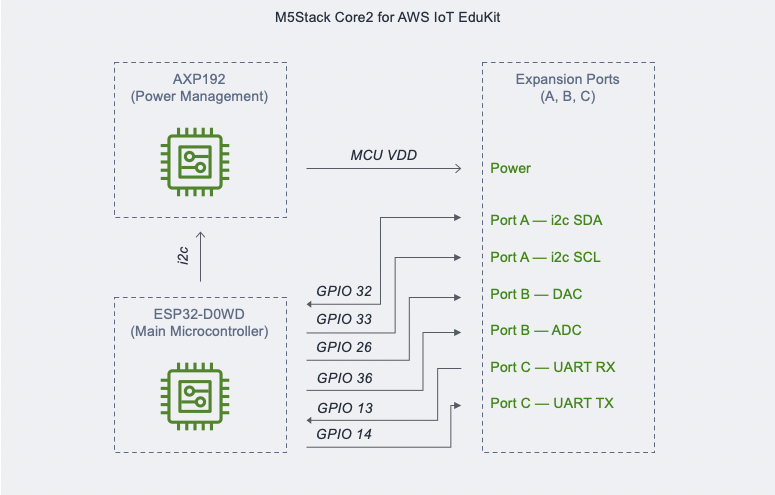
The APIs for the side expansion ports wrap Espressif's peripherals APIs to simplify configuration and usage of GPIO, I2C, ADC, DAC, and UART. All GPIOs support digital read & write. The APIs provided are only for convenience and may not be sufficient for all peripherals that are plugged in. For accessing complete functionality of all the attached peripherals, visit Espressif's official documentation and view their examples on GitHub. Please note that using Espressif's examples would require changing the pin configurations to the match the available pins listed in the table below.
| Port | Pin | Feature | Helpful Macro Definition(s) to Access Pin |
|---|---|---|---|
| A | 32 | I2C SDA | PORT_A_SDA_PIN or GPIO_NUM_32 |
| A | 33 | I2C SCL | PORT_A_SDA_PIN or GPIO_NUM_33 |
| B | 26 | DAC | PORT_B_DAC_PIN or GPIO_NUM_26 |
| B | 36 | ADC | PORT_B_ADC_PIN or GPIO_NUM_36 |
| C | 13 | UART RX | PORT_C_UART_RX_PIN or GPIO_NUM_13 |
| C | 14 | UART TX | PORT_C_UART_TX_PIN or GPIO_NUM_14 |
To enable this feature using KConfig, use the command pio run --environment core2foraws --target menuconfig from within the root of the project directoy in your PlatformIO terminal window and go to the menu Component Config --> Core2 for AWS features to set the features you want to enable.
The example code sets GPIO 26 (same as PORT_B_DAC_PIN) as an input, creates a FreeRTOS task which periodically (1s) reads from GPIO 26 to see if a peripheral that outputs high on that line is connected. The task prints the returned value to the serial monitor.
 1.9.3
1.9.3